Tuesday, April 28, 2020

Using Non Clustered Indexes in SQL Server

In general most of us believe indexes improve performance of our select queries. But as with every other thing, this too doesn't holds true universally. They only help in their specific use cases.

Indexes are sure to take a toll on your insert, update and delete queries and may even negatively impact select queries if not created properly. To judiciously create indexes we need to understand when a particular index will be of help. Below are scenarios which may help you figure out the right kind of non clustered index for your particular use case.

To begin with, let us create a test table and populate it with some data.


Scenario 1: One non clustered index per column

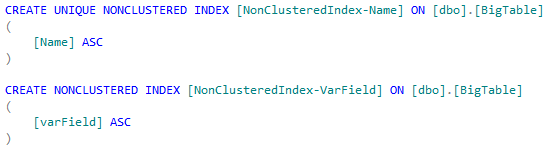
Suppose we have below query on our table. To cater this query two separate indexes one each on columns "Name" and "VarField" are required. This is so because where clause in our query has two conditions joined with OR operator.


Note: If you have 10 fields in your where clause then this doesn't means you gotta create ten indexes. You should create and test and then decide on right balance. 

Create index script:


Scenario 2: Multiple key columns in single non clustered index (Composite Index)

Now suppose above query changes from OR condition to AND condition, in that case having one index comprising of both columns will be a better solution as we will get data from index in one go. If we had two different indexes one each for both fields then SQL engine would have used only one of those indexes and did a key lookup for second condition.


Create index script:


Scenario 3: Covering index

Now say we need to search on Name field and fetch value of VarField, in this case covering index comes to our rescue. Covering indexes should be created for hot columns or those fields that are accessed very frequently. If we have lot many columns and different queries fetching different set of columns then better will be to use index on where clause field only.


Create index script:


SQL Indexing is a very vast topic and I hope this will help you begin appreciating idea of making indexes judiciously and not on every other column blindly. 

Happy Coding!!

Friday, April 24, 2020

Generic MinHeap implementation

With things in complete lockdown due to coronavirus situation world over, I was getting bored this weekend. Also I hadn't added any new post here in this blog for quite some time. So thought to write a new post, kind of killing two birds with a stone :P

In today's post I am going to talk about MinHeap. 

A min-heap is a binary tree such that - the data contained in each node is less than (or equal to) the data in that node’s children. - the binary tree is complete

Heaps are useful when we need priority queue kind of structure. Here instead of adding a new item at the end of queue, it could be inserted further up the queue depending on their priority. This helps in a lot of scenario but lesser beings like me could tell you that I used it while solving merge n sorted array task at hacker rank but to see a real real world use case, you may check this Quora answer.

Below is my array based generic implementation of MinHeap in C#. Using array for heap makes it easy to access child/parent nodes, we can do so by using simple formulae:
    parentPosition => (currentChildPosition - 1) / 2
           leftChildPosition => 2 * currentChildPosition +1
rightChildPosition => 2 * currentChildPosition +2

You may like to check this link for more details on heap. Stay Home, Stay Safe!

Thursday, May 24, 2018

Cage The Monster


Round: 1
Total Caged: 0
Easy Difficult

Friday, September 15, 2017

SQL Server Not operator with nullable values


Null values are always tricky and in last couple of days I spent quite some time wrapping my head around one such case. Here’s knowledge bite from that effort which might help you to devise better queries in your projects.

QUERY 1
declare @num1 int = 5
if (@num1 = 1)
       select 1
else
       select 0

Output of above query is 0 as expected.


QUERY 2
declare @num1 int = 5
if NOT (@num1 = 1)
       select 1
else
       select 0

Output of above query is 1 as expected.

QUERY 3
declare @num1 int
if (@num1 = 1)
       select 1
else
       select 0

Output of above query is 0 as expected.

QUERY 4
declare @num1 int
if (@num1 = 1 OR 4 < 5)
       select 1
else
       select 0

Output of above query is 1 as expected.

QUERY 5
declare @num1 int
if NOT (@num1 = 1 OR 4 < 5)
       select 1
else
       select 0

Output of above query is 0 as expected.

QUERY 6
declare @num1 int
if (@num1 = 1 OR 4 > 5)
       select 1
else
       select 0

Output of above query is 0 as expected.

QUERY 7
declare @num1 int
if NOT (@num1 = 1 OR 4 > 5)
       select 1
else
       select 0

Output of above query is 0 UNEXPECTED (at-least I was very surprised).

Conclusion:
In SQL Server comparison operations involving null values result in unknown which is treated as falsy. Such falsy (unknown) values when passed to Boolean operator result in false. This problem gets aggravated for some of us because we work on javascript a lot and there falsy is false.

Handle null values carefully and remember below table:
true || true                                        => true
true || unknown                              => true
false || unknown                             => false

NOT (true || unknown)                  => false
NOT (false || unknown)                => false

Note: all queries above executed on SQL Server 2014

Happy and Safe Coding ;) 

Thanks,

Ravi Gupta

Thursday, December 24, 2015

Hello World Quartz Job

A few days back I needed to use Quartz for some task and I really struggled quite a bit to get running with my hello world quartz service. Now since I am up and running I thought to share and save an hour or two for someone else :)

Next are steps for creating a simple Hello World Quartz Job.

Step 1: Create a new windows service project in Visual Studio, you may also use an console application or whatever else you can think of :)


Step 2: Add Quartz to your project using nugget, you may add nugget reference or add quartz reference from somewhere else if you want. Doing nugget way is better it also automatically installs the required dependencies.


.

Step 3: Every quartz job has two important things, first is "what needs be done" and second is "when it needs be done"

To tackle first part that is "what needs be done", we need to create a class file to define Job. So add a new .cs file and name the class whatever your want. For this sample I'll take it as SampleJob. This class needs to implement IJob interface present in Quartz namespace.


Execute method as shown in above image comes when you implement IJob interface. Here in this sample I simply added a line to append some text to a text file.

To tackle second part that is "when it needs be done", check step 4

Step 4: Quartz provide two ways to schedule jobs, one is through code and other is using XML. Second approach is what I'll go with as I find it more useful. Here you will add an XML file and specify which job needs be executed and when it needs be triggered.


In this xml file we do define job schedule, that is when a job needs be executed. For each job you want to schedule add one schedule node. Each schedule node will have their respective job and trigger nodes.

Under job node we have job-type node which wasted loads of time and prompted me to write this post. In this node we have two comma separated values, first one is class name of job that you want to schedule and second value is assembly name. Be careful here I firstly added namespace of Service class file with class name and banged my head for quite some time before figuring out why my jobs were not running.


Step 5: Next is to wire-up quartz scheduler with windows service/console app (or whatever else you are using), just add three lines in OnStart method as shown in below image


Step 6: For scheduling jobs using XML file you need to do a few configurations in App.config file, below are those settings


Value of setting with name quartz.plugin.xml.fileNames is path of jobs xml file(one that we created in step 4 above).

Now you are all set from coding side of things and ready to install your service. You may use whatever way you want to deploy windows service, I used installutil.exe utility for the same.

using installutil.exe:

1. Build your project
2. Open visual studio command prompt
3. Execute command
    installutil.exe
4. Now open service manager console using services.msc command in run box
5. Find your service and click start

That's it, you are done and your small hello world quartz job is up and running.


Merry Christmas :)

Friday, October 10, 2014

Windows Powershell Script - write to both console and file

Few days back I was writing my first power shell script and thought to write my output to both console and some logfile. Surprisingly it wasn't as simple I thought and I ended up doing this.
function logMsg($msg)
{
    write-output $msg
    write-host $msg 
}
usage in script:
logMsg("My Error Msg")
logMsg("My Info Msg")
powershell script execution call:
ps> .\myFirstScript.ps1 >> testOutputFile.txt

here write-host is to write to console and write-output takes care of writing to my log file.

Friday, April 4, 2014

C# : HTML to PDF conversion

This is relatively free day today and I thought to utilize it by writing a bit :)

Sometime back I needed to create pdf from my html page, to do that I ended up using ITextSharp library which is a very decent library for this purpose. It doesn't provides much support for complex css, but is still very good for simple pages as was in my case.

Issue came when my html was using special symbol for less than equal to operator(≤). ITextSharp simply ignored it, so i came up with below solution that I found on a SO answer.

Solution: Use StyleSheet with font Arial while parsing html. Below is my method to convert html to PDF, code for style sheet is highlighted.
I used Arial font, but you might need some other depending on characters you need to support, so do a bit testing.


private MemoryStream CreatePdfStream(string html)
        {
            using (TextReader htmlReader = new StringReader(html))
            {
                string fontPath = Path.Combine(Environment.GetFolderPath(Environment.SpecialFolder.Fonts), "Arial.TTF");
                StyleSheet style = new StyleSheet();
                if (File.Exists(fontPath))
                {
                    FontFactory.Register(fontPath);
                    style.LoadTagStyle("body", "face", "Arial");
                    style.LoadTagStyle("body", "encoding", BaseFont.IDENTITY_H);  
                }

                using (Document document = new Document())
                {
                    MemoryStream pdfStream = new MemoryStream();
                    PdfWriter pdfWriter = PdfWriter.GetInstance(document, pdfStream);
                    pdfWriter.CloseStream = false;
                    document.Open();

                    List<IElement> elements = HTMLWorker.ParseToList(htmlReader, style);
                    elements.ForEach(e => document.Add(e));
                    document.Close();
                    pdfStream.Position = 0;
                    return pdfStream;
                }
            }

        }

Monday, October 14, 2013

What volatile is actually good for

Today I was reading about something on SO and stumbled to this note about volatile keyword in C#, it seemed to be nice simple explanation of widely misunderstood term so I am sharing it here.

A good example is say you have 2 threads, one which always writes to a variable (say queueLength), and one which always reads from that same variable.
If queueLength is not volatile, thread A may write 5 times, but thread B may see those writes as being delayed (or even potentially in the wrong order).
A solution would be to lock, but you could also in this situation use volatile. This would ensure that thread B will always see the most up-to-date thing that thread A has written. Note however that this logic only works if you have writers who never read, and readers who never write, and if the thing you're writing is an atomic value. As soon as you do a single read-modify-write, you need to go to Interlocked operations or use a Lock.
I got this at below URL

Saturday, October 12, 2013

jQuery dynamic validation error messages

I am not a champ at asp.net mvc and found myself struggling with a task that at first I thought will be trivial, below is how I got through it :)

I wrote a custom validation attribute and needed to show validation messages as per values entered. Below is stripped down version of what I ended up doing:

Below lines add validation attribute named checkagainstmaxsumvalue that checks values of two fields and decides error messages dynamically

jQuery.validator.unobtrusive.adapters.add("checkagainstmaxsumvalue", ["dependentproperty1", "dependentproperty2"], function (options) {

    options.rules['checkagainstmaxsumvalue'] = {
        prop1: options.params['dependentproperty1'],
        prop2: options.params['dependentproperty2']
    };

});

jQuery.validator.addMethod("checkagainstmaxsumvalue", function (value, element, params) {
        var result = true;
        var prop1 = parseInt($('#' + params['prop1']).val(), 10);
        var prop2 = parseInt($('#' + params['prop2']).val(), 10);

        var errMsg = getErrorMessage(prop1, prop2);
        if (errMsg) {
            result = false;
        }
        return result;

    }, function (params, element) {
        var prop1 = parseInt($('#' + params['prop1']).val(), 10);
        var prop2 = parseInt($('#' + params['prop2']).val(), 10);
        return getErrorMessage(prop1, prop2);
    }
);

//Validation logic here, returns error message if validation fails 
//and empty string if success
function getErrorMessage(prop1, prop2) {
    var errMsg = "";
    if (prop1 < 20 && prop2 < 20) {
        errMsg = "Either of prop1 and prop2 should be greater than 20";
    } else if (prop1 + prop2 > 30) {
        errMsg = "Sum of prop1 and prop2 should be less than equal to 30";
    }
    return errMsg;

}

This all I did after reading below answer at every developer's life saver site SO :)
http://stackoverflow.com/questions/13352626/dynamic-jquery-validate-error-messages-with-addmethod-based-on-the-element#answer-13352987

This worked perfectly fine in my case but still there is concern that validation logic executes twice, once for deciding message and once for actual verification. This sounds a bit overkill but till now I didn't have a better option.

About Me

My photo
Delhi, India
Fun, music, travel and nature loving, always smiling, computer addict!!