Monday, May 9, 2011

More than one view or edit controls in a custom DNN module

In DNN custom modules, we can have multiple view/edit controls.

Below are the steps to do so:

  • Add a new control to your module, to do so go to
Host Menu >> Module Definition >> Edit module by clicking pencil icon on left


  • On clicking “Add Module Control”, you will get a screen as below
    • Enter a key; this will serve as id when you will like to traverse to this control from some other control.
    • Select control from drop down list (of course the control needs to already exist in modules folder which in turn is under desktop modules folder). Things will look somewhat like below image.

  • Adding a new landing control
    • Edit your previous landing control by editing it and assigning it a control key.

At this point of time if you will visit any page with this module added, you will get a blank page as there is no specified landing control for your module.

    • Now add a new control in similar way as above with just a single difference. This time you don’t have to assign the control query. A control with no control key serves as a landing page.

  • Now its all set, put up your required logic on controls and access your newly added controls. To access these, you can use below code snippet
hlnkNewView.NavigateUrl = Globals.NavigateURL(PortalSettings.ActiveTab.TabID, "newView", "mid=" + ModuleId.ToString());

o       You can find Globals.NavigateURL under DotNetNuke.Common class.
o       First parameter of NavigateURL method is TabId of current page.
o       Second parameter is control id given by us ("newView" in our case here).
o       Third parameter is moduleId of current module.

Here hlnkNewView is an ASP Hyperlink control; you can use some other also ;)

This is all that needs to be done for having more than one view/edit controls in a single custom DNN Module.

Apart from this approach you can use ASP.NET MultiView control to manage multiple views. Rafe Kemmis has a great post about it at Managing Views In Your DotNetNuke Module

Sunday, April 24, 2011

Column is invalid in the select list because it is not contained in either an aggregate function or the GROUP BY clause.

Hi All,

Few days back I was stuck a bit with a SQL problem, I got it resolved with the suggestion of one of my colleagues(Anup). I have to access record  from SQL SERVER 2008 based on an aggregate function. But I got error “Column is invalid in the select list because it is not contained in either an aggregate function or the GROUP BY clause.

Structure of my table was somewhat like below:


What I wanted from this table was records per UserId where CreatedDate is equal to minimum CreatedDate. So first I framed a query as below:

SELECT UserID, MIN(CreatedDate)
FROM RenewalHistory
Group By UserID
           (QUERY  1)
This worked fine giving me the expected results and then I added column SubscriptionType to select list, making my query like below:

SELECT UserID, MIN(CreatedDate), SubscriptionType
FROM RenewalHistory
Group By UserID
           (QUERY  2)
This started giving me error saying Column 'RenewalHistory.SubscriptionType' is invalid in the select list because it is not contained in either an aggregate function or the GROUP BY clause."

To overcome this, I used table produced in query 1 as a sub-table and reused it to get desired record as shown in below query:

SELECT rh.Id, rh.UserId, rh.SubscriptionType, rh.Createddate
FROM RenewalHistory rh, (
      SELECT UserId, MIN(CreatedDate) AS CreatedDate
      FROM RenewalHistory
      Group By UserID) subRH
WHERE rh.UserId = subRH.UserId AND
rh.CreatedDate = subRH.CreatedDate
           (QUERY  3)

This was how I got my problem solved. But I feel this is not the best way to sort out this problem, so if you have some better solution for this problem. Then kindly share it here.

Saturday, April 23, 2011

Horizontal Sidebar in ASP.NET Wizard Control

Hi All,

Below is a simple yet very powerful hack to make ASP.NET Wizard control do what it should also be able to do but isn’t. That is the “horizontal sidebar for wizard steps”.

So here are the steps:

  • Add an ASP.NET wizard control to a page or user control and add wizard steps to it as per your requirement. It will look some what like below:
Default Appearance of Wizard Control
  • Now add side bar template to this control, like I did in below code snippet.
<SideBarTemplate>
<asp:DataList runat="server" ID="SideBarList" HorizontalAlign="Justify" RepeatDirection="Horizontal">
            <ItemTemplate>
                  <div id="divWizardSampleSidebar" runat="server" class="div-WizardSample-Sidebar-Steps">
                        <asp:LinkButton runat="server" ID="SideBarButton" Enabled="true" Font-Bold="true" />
div>
ItemTemplate>
asp:DataList>
                </tr><tr>
SideBarTemplate>

  • In above code lines, everything is normal, except the last second line that is highlighted in green color. This line is the one that is creating magic. After using it, wizard will look like below:

After Using Hack
 Actually, ASP.NET wizard control renders sidebar with steps and controls in two different "td" tags under same row and here I just injected a pair of opening and closing "tr" between those to make two separate rows for steps and controls. This forced wizard control to render separate rows for both steps and contents.

Now apply some css and make your wizard look a bit more appealing.

If you have better steps to make horizontal sidebar in ASP.NET wizard control then kindly let me know.

Sunday, February 27, 2011

Extract images from Word files

A few days back I was in need to copy an image from a MS-Word document so that I can add it somewhere else. I thought that I would be able to copy/paste the image in ctrl+c/ctrl+v way, but it didn't worked. So I tried a rather unorthodox way. Steps I took are as below:
  • Saved my .doc file as .docx file
  • Changed the extension to .rar
  • Extract this .rar file
  • I got folder hierarchy as below


This folder hierarchy was made by extracting the rar file. Here you could see the media folder selected. Here you can find all the images in the word document. Thats it.

This trick also works for open office files.

Sunday, February 20, 2011

Creating a DNN module


Below are the steps for creating a DNN module:

  1. Install DNN starter kit, this will let you to automate many of the procedures which you had to perform manually like creating manifest file, folder hierarchy, etc. You can download DNN starter kit from below link:

  1. Now create a new web project in visual studio and select DotNetNuke Compiled Module option(as shown in below image)

  1. In the newly created project you will get below:
    1. 3 user controls
    2. Classes for interacting with database and holding business logic.
    3. Files for installing and uninstalling database scripts while installing/uninstalling module.
    4. Manifest file (with extension .dnn)
    5. A documents folder containing files to tell you what to do next.
  2. Now right click the project name in solution explorer and select properties option there.
    1. Here under ‘Application’ tab set Assembly name and default namespace as desired.
    2. Under ‘Build’ tab select output path to bin folder of your DNN installation. This will save you effort to manually copy & paste .dll file from your module’s project folder to dnn website’s bin folder.
    3. Also you can place XCOPY command in “Build Events” tab to automatically copy ascx controls from your module’s project folder to DNN desktop module folder. For example in this case it will be somewhat like below:
XCOPY “/*.ascx” “” /q /y
Remember to place this on post build event only so as to avoid wrong controls from reaching your main folder.


(Above two steps are not mandatory, they are just to speed up your process by automating a few steps)

  1. By default, this template gives “YourCompany.Modules.” as default namespace for all classes, change it appropriately in all user controls, provider classes and controller classes.
  2. By default, view control has view control has a DataList control added to it, remove it and add your custom code. In this sample module I am going to show meaning of a word entered.
  3. Create logic as required in controls and controller classes and build your project.
  4. Now edit .dnn file and edit it for name, version and files.
  5. Now you need to register your newly created module with your dnn installation.
  6. For this create a new folder under desktop modules folder in your DNN installation and copy paste below files into it:
    1. App_LocalResources, whole folder
    2. ASCX files
    3. SQLDataProvider files
    4. Uninstall. SQLDataProvider files
    5. Module.css
  7. Now login as host user and go to Module Definition section under host menu, click on “create new module” option.
  8. There will be a drop down saying “Create Module From:”, select manifest in it.
  9. Now select folder you created for new module from the drop down list, after doing so “Resource” drop down will get populated with manifest file name.
  10. Now click “Create Module” link.


That’s it your module is ready to be placed on any page.

DotNetNuke Error Domain Name Windows XP Does Not Exist In The Database

A few days back while installing DNN 5.5.1 I got following error message "DotNetNuke Error  Domain Name Windows XP Does Not Exist In The Database" repeatedly. 

I tried everything from tweaking web.config to reinstalling ASP.NET but error kept on occurring. After this I was convinced that this is a database permission error. So I reinstalled database as below and there it goes, my problem got resolved.

Steps I followed are as below:

  • Create a DotNetNuke database in SQL Server.


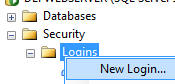
  • Under the main Security node (not the one under the database you just created), right-click on Logins and select New Login


  •  Create an account that uses SQL Server authentication and provide a password.


  • In the database you created, select Security then right-click on Users and select New User.


  • Enter the account you created and select db_owner for both "Schemas owner by this user" and "Database role membership".  Click OK.


I used below reference link for this:

http://www.adefwebserver.com/DotNetNukeHELP/DNN4_DevelopmentEnvironment/DNNDevelopmentWindowsVista.htm

Hope this helps you guys also.

Monday, January 24, 2011

Foreign key not working in MySQL.

Why can I INSERT a value that's not in the foreign column?

I have created two tables on MYSQL using phpMyAdmin and assigned primary and foreign key constraint( as in below queries). I didn't got any error but still I was able to insert wrong values in it. This frustrated me quite a lot. I tried my queries several times on phpMyAdmin, I also tried those queries on SQL SERVER and they worked as they should do.

After googling sometime for this problem I got the reason and the culprit was 'storage engine MyISAM'. I altered it to InnoDB and it worked like a magic immediately.

Query used for changing storage engine:

ALTER TABLE actions ENGINE=InnoDB;
 
Create table queries I used:

CREATE TABLE IF NOT EXISTS `emp` (
  `id` int(11) NOT NULL,
  `emp_name` varchar(255) NOT NULL,
  `role` bit(1) NOT NULL,
  PRIMARY KEY (`id`)
) ENGINE=InnoDB DEFAULT CHARSET=latin1; 

CREATE TABLE IF NOT EXISTS `emp_expertise` (
  `emp_id` int(11) NOT NULL,
  `speciality` varchar(50) NOT NULL,
  KEY `emp_id` (`emp_id`)
) ENGINE=InnoDB DEFAULT CHARSET=latin1;

ALTER TABLE `emp_expertise`
  ADD CONSTRAINT `emp_expertise_ibfk_1` FOREIGN KEY (`emp_id`) 
  REFERENCES `emp` (`id`) 
  ON DELETE CASCADE 
  ON UPDATE CASCADE;

INSERT INTO `emp` (`id`, `emp_name`, `role`) VALUES
(1, 'Ravi', b'1'),
(2, 'Vishwesh', b'1'),
(3, 'Ajay', b'0'),
(4, 'Ramesh', b'0');

Below query was previously inserting but after I fired above 
ALTER query it stopped.
 
INSERT INTO emp_expertise (emp_id, speciality)
VALUES (55,'XYZ')

Saturday, December 25, 2010

Code behind file not found

"If your code behind files are not compiling to dll then the problem could be codefile attribute, replace it with codebehind"
 
Hi All,

A few days back while working on a DNN module which is actually an extension to DNN core module Survey I faced a problem.

As this module's code comes in WSP version I copied C Sharp version of its code in DNN module template type visual studio project and then compiled it so as to get a DLL of its code. It got built after a few arrangements(like commenting a few lines :)

Then I copied the DLL to bin folder and tried to create module as per the procedure. It worked good all the way around till module creation. Then I added this newly created module to a page and BANG!!, here comes the error.

Error said,
type survey.ascx.cs not found

Note: survey.ascx is the view control of my module.

From the error message and placing code behind files in module folder I figured out that my module was able to get code in files like provider model classes and controller and info classes. It was just not getting the code-behind files of the ASCX controls used although it was able to pick codebehind code if if I place the code behind files in module's folder itself.

Thus problem became clear that something was stopping code behind files from compiling. So I compared my survey.ascx file with an old module's viewcontrol.ascx file and in the first line I got the culprit.

It was "codefile" attribute in ascx file's code directive line. I replaced it with codebehind and the problem was resolved.

So the moral of story is
if your code behind files are not compiling to dll then the problem could be codefile attribute, replace it with codebehind and enjoy!!!!!

Friday, December 24, 2010

Drop failed for database. Currently in use. Error 3702

Hi All,

Yesterday while working on DNN I needed to restore my website to a previous state. So I thought to drop my current working database and restore a backup copy.

I use MSSQL SERVER 2005. While dropping my working database I got error as below

Drop failed for database {database name}

cannot drop database because it is currently in use. Error 3702


To resolve this problem I googled a bit and then found below as a solution. This worked as a magic to my problem.

USE Master;
GO

ALTER DATABASE {database name} SET SINGLE_USER WITH ROLLBACK IMMEDIATE
GO

DROP DATABASE {database name};
GO


Hope it helps you guys also.

Friday, November 12, 2010

The name 'Session' does not exist in the current context

Today while working on an ASP.NET web application I faced this problem accessing session variable in a C# file. After thinking for a while I got the problem. Problem was that I was trying to access Session variable from a class file in the library project, and this file was neither web form, user control or a class derived from System.Web.UI.

Session variables like Session["ProjectID"] can only be accessed from Web Forms, custom controls and from class inherited from System.Web.UI

After googling a bit I found that to access value of session variable in this case we can use line like below:

HttpContext.Current.Session["ProjectID"];


Similar sort of problem I also faced while trying to get root directory of a windows application. This time while development I tried code line "System.Windows.Forms.Application.StartupPath" in visual studio quickWatch and found it to be giving correct answer(Application root directory path) but as soon as I thought to use it in my project, it refused to build saying "namespace Windows can not be found, please check for missing assembly reference". Problem in this case was similar to above i.e, this line can't be accessed from a non windows form file.

About Me

My photo
Delhi, India
Fun, music, travel and nature loving, always smiling, computer addict!!